
Table des matières
- 2026:
- 2025:
4 billet(s) pour septembre 2026
| Notes HTTP Strict Transport Security - HSTS | 2026/09/18 11:04 | Jean-Baptiste |
| Notes GNU Linux GPU carte graphiques | 2026/09/08 15:49 | Jean-Baptiste |
| Notes GNU Linux graphique | 2026/09/08 15:42 | Jean-Baptiste |
| Notes urlencoding - passer des mots de passe en HTTPS | 2026/09/03 17:58 | Jean-Baptiste |
Chroot Linux
Voir :
Chroot Infinite BusyBox with systemd
- switch_root
libpam-chroot: /lib/security/pam_chroot.so
Voir fakeroot et consorts
- fakeroot
- fakeroot-ng
- proot
- become-root
- rootlesskit (Linux-native “fake root” for rootless containers) and yet slow):
Voir aussi :
- pivot_root & switch_root
- Docker
- bwrap
-
- ex :
firejail --dns=8.8.8.8 firefox
- Procenv
chrootont.sh
CHROOTDIR=/home/chroot

mkdir ${CHROOTDIR}
mkdir ${CHROOTDIR}/{dev,dev/pts,sys,proc,run,etc,bin,lib,lib64,usr,var,var/run,/var/log,var/lib,/etc/init.d,home,tmp,root}

mount -t sysfs /sys ${CHROOTDIR}/sys
mount -t proc proc ${CHROOTDIR}/proc
mount -n -t tmpfs none ${CHROOTDIR}/dev

mkdir ${CHROOTDIR}/dev/pts
mkdir ${CHROOTDIR}/dev/shm

mount -vt devpts -o gid=4,mode=620 none ${CHROOTDIR}/dev/pts
mount -vt tmpfs none ${CHROOTDIR}/dev/shm

mknod -m 622 ${CHROOTDIR}/dev/console c 5 1
mknod -m 666 ${CHROOTDIR}/dev/null c 1 3
mknod -m 666 ${CHROOTDIR}/dev/zero c 1 5
mknod -m 666 ${CHROOTDIR}/dev/ptmx c 5 2
mknod -m 666 ${CHROOTDIR}/dev/tty c 5 0
mknod -m 444 ${CHROOTDIR}/dev/random c 1 8
mknod -m 444 ${CHROOTDIR}/dev/urandom c 1 9
chown root:tty ${CHROOTDIR}/dev/{console,ptmx,tty}
#mknod -m 600 ${CHROOTDIR}/dev/rtc c 254 0

cp -p /etc/hosts /etc/hostname /etc/resolv.conf /etc/nsswitch.conf /etc/host.conf /etc/gai.conf /etc/profile /etc/environment ${CHROOTDIR}/etc/
touch ${CHROOTDIR}/etc/fstab

mkdir ${CHROOTDIR}/etc/network
cp -p /etc/network/interfaces ${CHROOTDIR}/etc/network

mkdir ${CHROOTDIR}/etc/default/
cp -p /etc/default/rsyslog ${CHROOTDIR}/etc/default/
cp -p /etc/default/ssh ${CHROOTDIR}/etc/default/

egrep "^root:|^jibe:^sshd:" /etc/passwd > ${CHROOTDIR}/etc/passwd

chroot ${CHROOTDIR} /bin/bash
#mount -vt devpts -o gid=4,mode=620 none /dev/pts
#mount -vt tmpfs none /dev/shm

chroot ${CHROOTDIR} /bin/bash

exelist='ls mount ps bash dmesg vim tail'
Exemple avec bash
ldd /bin/bash
mkdir ${CHROOTDIR}/lib/x86_64-linux-gnu/ -p
cp -p /lib/x86_64-linux-gnu/libncurses.so.5 ${CHROOTDIR}/lib/x86_64-linux-gnu/
cp -p /lib/x86_64-linux-gnu/libtinfo.so.5 ${CHROOTDIR}/lib/x86_64-linux-gnu/
cp -p /lib/x86_64-linux-gnu/libdl.so.2 ${CHROOTDIR}/lib/x86_64-linux-gnu/
cp -p /lib/x86_64-linux-gnu/libc.so.6 ${CHROOTDIR}/lib/x86_64-linux-gnu/
cp -p /lib64/ld-linux-x86-64.so.2 ${CHROOTDIR}/lib64/
cp -p /bin/bash ${CHROOTDIR}/bin/

# Authentification
cp -a /etc/pam.* /home/chroot/etc/
cp -a /etc/security /home/chroot/etc/
cp -p /etc/login.defs /home/chroot/etc/
cp -p  /etc/securetty /home/chroot/etc/
cp -p /lib/x86_64-linux-gnu/libnss_files.so.2 /home/chroot/lib/x86_64-linux-gnu/libnss_files.so.2

cp -a /etc/rsyslog.* /home/chroot/etc/
cp -p /etc/init.d/rsyslog /home/chroot/etc/init.d/
mkdir /home/chroot/usr/lib
cp -a /usr/lib/rsyslog /home/chroot/usr/lib/
mkdir -p /var/spool/rsyslog

cp -p /usr/sbin/sshd /home/chroot/usr/sbin/
cp -a /etc/ssh/ /home/chroot/etc/

# Locale
cp -a /usr/lib/locale /home/chroot/usr/lib/

#cp -a /usr/share/zoneinfo /home/chroot/usr/share/
Pour top, atop
'xterm': unknown terminal type
cp -a /lib/terminfo /home/chroot/lib/

touch ${CHROOTDIR}/var/log/wtmp
touch ${CHROOTDIR}/var/log/auth.log


touch ${CHROOTDIR}/var/log/messages ${CHROOTDIR}/var/log/syslog ${CHROOTDIR}/var/log/kern.log ${CHROOTDIR}/var/log/daemon.log ${CHROOTDIR}/var/log/lastlog

cp -r /etc/skel /home/chroot/home/jibe


touch /home/chroot/home/jibe/.Xauthority
chown jibe: -R  /home/chroot/home/jibe

chroot ${CHROOTDIR}

chmod 1777 /home/chroot/tmp

#mkdir -p /var/cache/apt/archives/

cp -p /etc/init.d/ssh /home/chroot/etc/init.d/

#Pour les script init (services)
cp -a /lib/lsb /home/chroot/lib/
Truc ?
/etc/passwd
chroot:x:1010:1015:,,,:/home/chroot:/usr/local/bin/chrootshell
/usr/local/bin/chrootshell
#! /bin/bash

#exec -c /usr/sbin/chroot /home/$USER /bin/bash
#sudo /usr/sbin/chroot /home/$USER /bin/bash
sudo /usr/sbin/chroot /home/$USER /bin/bash -c "su - jibe"
http://smhteam.info/wiki/index.linux.php5?wiki=ChrooterUnUtilisateur
chroot ALL=(root) NOPASSWD: /usr/sbin/chroot
ATTENTION Grosse faille de sécurité que je n'explique pas (peut-être lié à PAM ou systemd) : Si l'utilisateur ouvre une session graphique avec le compte chrooté, chaque appli graphique sort du chroot. Malgrès mon noyau patché avec Grsecurity
mknod -m 666 /home/chroot/dev/tty8 c 4 8
Dans le chroot
/sbin/getty 38400 tty8
umount ${CHROOTDIR}/{dev/pts,dev,sys,proc,run}
umount ${CHROOTDIR}

rmdir ${CHROOTDIR}/{dev/pts,dev,sys,proc,run}
rmdir ${CHROOTDIR}

umount /chroot/*
umount /chroot/*
Comment savoir si je suis dans un chroot ?
Les numeros d'inodes peuvent être un indice
ls -id /
Voir http://stackoverflow.com/questions/75182/detecting-a-chroot-jail-from-within
Firejail
Voir : https://firejail.wordpress.com/documentation-2/firefox-guide/
firefail --seccomp --debug firefox
Mount kernel virtual file systems
Source : https://git.yoctoproject.org/poky/plain/meta/recipes-core/initscripts/initscripts-1.0/sysfs.sh
sysfs.sh
#!/bin/sh
#
# SPDX-License-Identifier: GPL-2.0-only
#

### BEGIN INIT INFO
# Provides:          mountvirtfs
# Required-Start:
# Required-Stop:
# Default-Start:     S
# Default-Stop:
# Short-Description: Mount kernel virtual file systems.
# Description:       Mount initial set of virtual filesystems the kernel
#                    provides and that are required by everything.
### END INIT INFO

if [ -e /proc ] && ! [ -e /proc/mounts ]; then
  mount -t proc proc /proc
fi

if [ -e /sys ] && grep -q sysfs /proc/filesystems && ! [ -e /sys/class ]; then
  mount -t sysfs sysfs /sys
fi

if [ -e /sys/kernel/debug ] && grep -q debugfs /proc/filesystems; then
  mount -t debugfs debugfs /sys/kernel/debug
fi

if [ -e /sys/kernel/config ] && grep -q configfs /proc/filesystems; then
  mount -t configfs configfs /sys/kernel/config
fi

if [ -e /sys/firmware/efi/efivars ] && grep -q efivarfs /proc/filesystems; then
  mount -t efivarfs efivarfs /sys/firmware/efi/efivars
fi

if ! [ -e /dev/zero ] && [ -e /dev ] && grep -q devtmpfs /proc/filesystems; then
  mount -n -t devtmpfs devtmpfs /dev
fi
Pb /etc/machine-id: No such file or directory
-bash: /etc/machine-id: No such file or directory
-bash: /proc/sys/kernel/random/boot_id: No such file or directory
-bash: /proc/sys/kernel/random/uuid: No such file or directory
Autres
chroot --userspec=nobody
Notes vieux PC ordinosaures OS léger
OS léger :
Optimisation OS :
Préhistoire Mainframe :
Notes vie privée
https://ssd.eff.org/en/module/attending-protest https://github.com/frombeirutwithlove/ProtestTips/blob/master/organizing.md#law-enforcement--data-collection
Anonymiser
Voir mat
Surveillance Ville
Guide
Fichage / GAFA / Bigdata
- https://fr.wikipedia.org/wiki/Exploitation_documentaire_et_valorisation_de_l'information_g%C3%A9n%C3%A9rale
Logiciel anonymat
Tuto EFF
Recommendations:
- Use different browsers for different use cases. More private browsers like DuckDuckGo, Brave, and Firefox are better for more sensitive activities. Keeping separate browsers can protect against accidental data spillover from one aspect of your life into another.
- Use a secondary email address and/or phone number to register sensitive accounts or give to contacts with whom you don’t want to associate too closely. Google Voice is a free secondary phone number. Protonmail and Tutanota are free email services that offer many privacy protections that more common providers like Gmail do not, such as end-to-end encryption when emailing others also on Protonmail and Tutanota, and fewer embedded tracking mechanisms on the service itself.
- Use a VPN when you need to dissociate your internet connection from what you’re doing online. Be wary of VPN products that sell themselves as cure-all solutions.
- If you're going to/from a location that's more likely to have increased surveillance, or if you're particularly worried about who might know you're there, turning off your devices or their location services can help keep your location private.
Safe Browsing
- Install privacy-preserving browser extensions on any browsers you use. Privacy Badger, uBlock Origin, and DuckDuckGo are great options.
- Use a privacy-focused search engine, like DuckDuckGo.
- Carefully look at the privacy settings on each app and account you use. Turn off location services on phone apps that don’t need them. Raise the bar on privacy settings for most, if not all, your online accounts.
- Disable the ad identifier on mobile devices. Ad IDs are specifically designed to facilitate third-party tracking, and disabling them makes it harder to profile you. Instructions for Android devices and iOS devices are here.
- Choose a browser that’s more private by design. DuckDuckGo on mobile and Firefox (with privacy settings turned up) on the desktop are both good options.
Numéro portable / SIM
Louer des numéros temporaires anonymement.
- OnOff (pas libre et contient des trackers)
Fuites / leaks

Notes vidéo - logiciels édition
éditeurs de vidéo non linéaires :
- blender
- cinelerra
- flowblade
- kdenlive
- lightworks
- olive video editor
- openshot
- pitivi
- shotcut
Notes Varnish
Varnish
Voir :
apt-get install varnish varnish-doc
/etc/systemd/system/varnish.service.d/plop.conf
# To add or override specific settings for the Varnish service, place a copy of
# this file in /etc/systemd/system/varnish.service.d/ with a ".conf" suffix,
# and edit to taste.  See man:systemd.directives for what you can change.
#
# To activate, run:
# * "systemctl daemon-reload"
# * "systemctl restart varnish"

# Add a documentation link to my own system documentation
[Unit]
Documentation=https://doc.example.com/client_a/varnish_service

[Service]
# Clear existing ExecStart= (required)
ExecStart=
# Set a new ExecStart=
ExecStart=/usr/sbin/varnishd -j unix,user=vcache -F -a :80 -T localhost:8080 -f /etc/varnish/default.vcl -S /etc/varnish/secret -s malloc,16g
/etc/varnish/default.vcl
#
# This is an example VCL file for Varnish.
#
# It does not do anything by default, delegating control to the
# builtin VCL. The builtin VCL is called when there is no explicit
# return statement.
#
# See the VCL chapters in the Users Guide at https://www.varnish-cache.org/docs/
# and https://www.varnish-cache.org/trac/wiki/VCLExamples for more examples.

# Marker to tell the VCL compiler that this VCL has been adapted to the
# new 4.0 format.
vcl 4.0;

# Default backend definition. Set this to point to your content server.
backend default {
    .host = "127.0.0.1";
    .port = "8080";
}

sub vcl_recv {
    # Happens before we check if we have this in cache already.
    #
    # Typically you clean up the request here, removing cookies you don't need,
    # rewriting the request, etc.
}

sub vcl_backend_response {
    # Happens after we have read the response headers from the backend.
    #
    # Here you clean the response headers, removing silly Set-Cookie headers
    # and other mistakes your backend does.
}

sub vcl_deliver {
    # Happens when we have all the pieces we need, and are about to send the
    # response to the client.
    #
    # You can do accounting or modifying the final object here.
}
VCL configuration Varnish will automatically append to your VCL file during compilation/loading : \ /usr/share/doc/varnish/examples/builtin.vcl.gz
Deux services :
- varnish
- varnishncsa (Display Varnish logs in Apache / NCSA combined log format)
mkdir /lib/systemd/system/varnish.service.d
#cp -p /lib/systemd/system/varnish.service /lib/systemd/system/varnish.service.d/plop.conf
cp -p /usr/share/doc/varnish/examples/systemd/varnish.commandline.conf /lib/systemd/system/varnish.service.d/plop.conf
vim !$
Varnish admin CLI
#varnishadm -S /etc/varnish/secret -T 127.0.0.1:6082
varnishadm -S /etc/varnish/secret -T 127.0.0.1:6082
Reload Varnish
Reload Varnish VCL without losing cache data
/usr/local/bin/varnish_reload.sh
#!/bin/bash

TIME=$(date +%s)
varnishadm vcl.load r_$TIME /etc/varnish/default.vcl
varnishadm vcl.use r_$TIME
/lib/systemd/system/varnish.service.d/reload.conf
[Service]
ExecReload=/usr/local/bin/varnish_reload.sh
chmod +x /usr/local/bin/varnish_reload.sh
systemctl daemon-reload

# Now you can reload with :
#systemctl reload varnish
VCL
Voir :
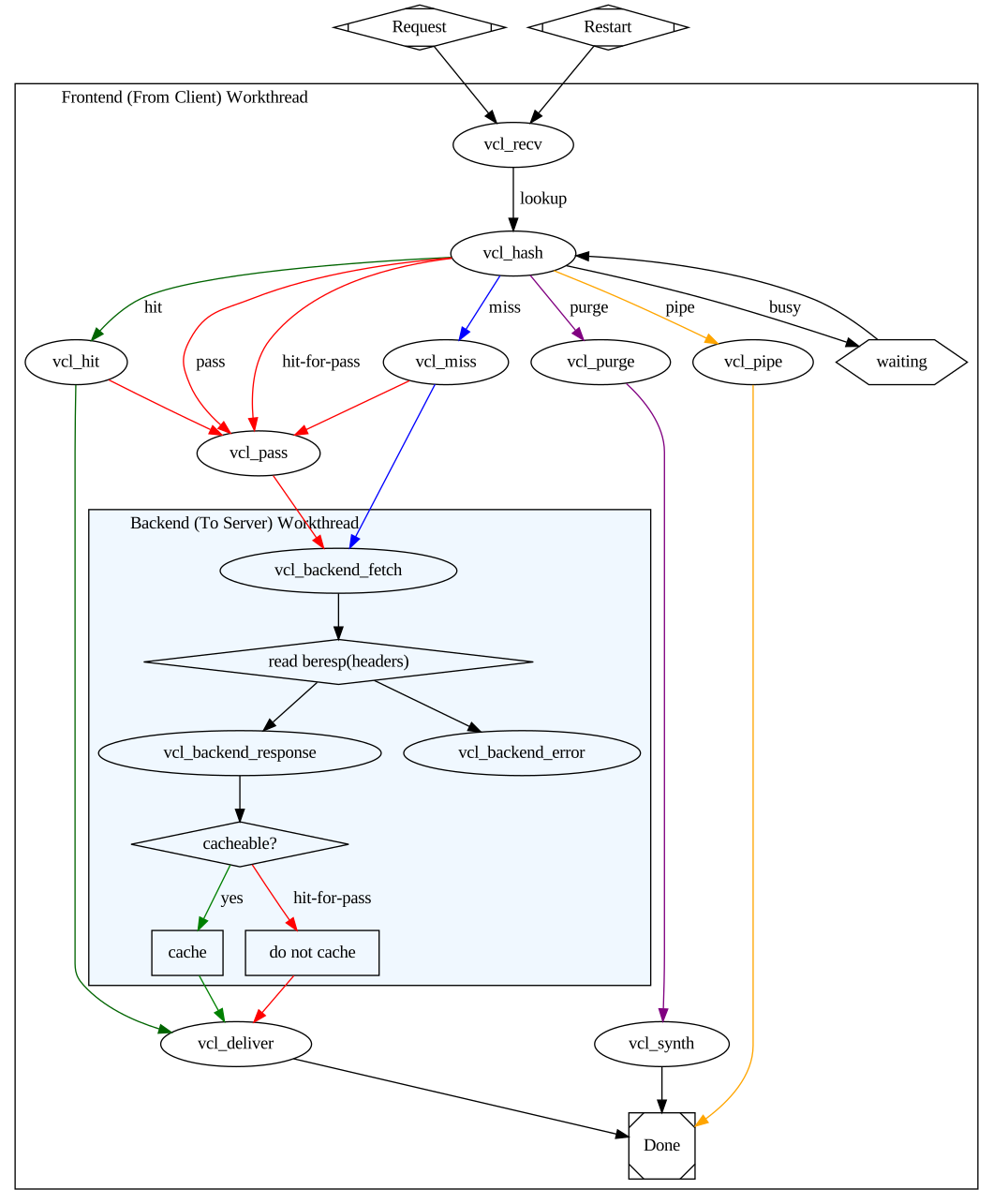
VCL
Actions coté client et backend :
- fail (Transition vers
vcl_synth)
Actions coté client :
- synth (synthérique, Transition vers
vcl_synth - pass (OK, ne pas utiliser le cache, eveltuelle transition vers
vcl_pass) - pipe (bypass Varnish, Transition vers
vcl_pipe) - restart
Actions coté backend :
- abandon (Unless the backend request was a background fetchTransition vers
vcl_synth)
Les Built-in subroutines coté client :
- vcl_recv (point d'entrée)
- vcl_pipe (bypass)
- etc…
Debug
varnishd -d -f /etc/varnish/default.vcl
Pour avoir la command de lancement du daemon avec les arguments :
systemctl status varnish
On enlève le -F et on le remplace par un -d
#sudo /usr/sbin/varnishd -j unix,user=vcache -d -F -a :6081 -T localhost:6082 -f /etc/varnish/default.vcl -S /etc/varnish/secret -s malloc,256m
sudo /usr/sbin/varnishd -j unix,user=vcache -d -d -a :6081 -T localhost:6082 -f /etc/varnish/default.vcl -S /etc/varnish/secret -s malloc,256m
Tapez start pour lancer le service
Vérifier la syntax du fichier VCL
varnishd -Cf /etc/varnish/default.vcl
Changer les headers
sub vcl_deliver {
        unset resp.http.Via;
        #unset resp.http.X-Powered-By;
        unset resp.http.X-Varnish;
        #unset resp.http.Age;
        unset resp.http.Server;
}
Purge du cache
curl -X PURGE -H "host: www.example.com" "www.example.com/foo"

# HTTPie
http PURGE "www.example.com/foo"
Bloquer (BAN)
varnishadm ban req.http.host == example.com '&&' req.url '~' '\\.png$
Autres
Architecture :
varnishlog -g raw
varnishstat -l
varnishstat -1 -n varnish_instancename
sudo varnishlog -n varnish_instancename -q 'ReqHeader ~ "Host: plop.fr"'
purge :
sub vcl_recv {
  # Add a unique header containing the client address
  remove req.http.X-Forwarded-For;
  set    req.http.X-Forwarded-For = client.ip;
  # [...]
}